Smitha: A Handwritten Font for Natural Web Design
As I was designing the hero section for a new boutique online store, I stumbled upon Smitha, a simple yet elegant handwritten font. The moment I saw it, I knew it would add the perfect touch of natural and approachable charm to the site.
Discovering Smitha's Visual Charm
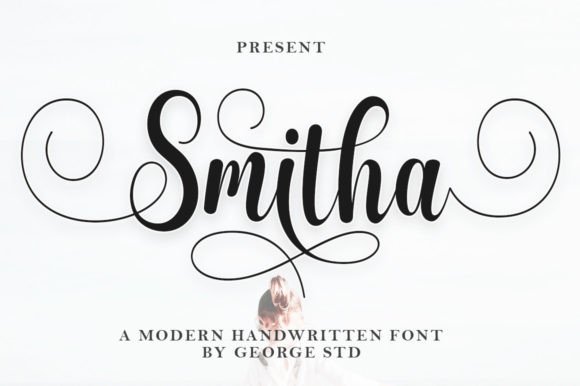
Smitha is a versatile script font that brings a personal and organic feel to any digital layout. Its flowing, slightly irregular strokes give it a genuine, hand-drawn appearance, making it ideal for adding a human touch to web designs. The font’s simplicity and readability make it a great choice for creating a welcoming and authentic brand experience.
Using Smitha in Website Headers and Hero Sections
For the boutique online store, I used Smitha in the main header and hero section. The font’s gentle curves and subtle variations in line thickness provided a warm and inviting welcome to visitors. It perfectly complemented the high-quality product images and gave the site a cohesive, professional look.
Enhancing Readability and Visual Hierarchy
One of the key considerations when using a decorative font like Smitha is readability. I tested it on various screen sizes, from desktops to mobile devices, and found that it maintained its legibility even at smaller sizes. For longer text, I paired Smitha with a clean sans serif font, ensuring that the overall design remained accessible and easy to read.
Applying Smitha to Call-to-Action Areas and Buttons
In the call-to-action (CTA) areas, I used Smitha for short, impactful phrases. The font’s unique style made the CTAs stand out, encouraging users to take action. For buttons, I kept the text brief and bold, ensuring that the CTA was both visually appealing and functional.
Creating a Consistent Brand Identity
To build a consistent brand identity, I integrated Smitha into other parts of the website, such as the blog headers and promotional banners. The font’s versatility allowed me to use it in different contexts, from the main logo to decorative accents, without losing its distinctive character.
Font Pairing and Design Assets
When pairing Smitha with other fonts, I chose a simple and modern sans serif for body text. This combination created a balanced and harmonious design, where the handwritten style of Smitha added personality, while the sans serif provided clarity and professionalism. For a more editorial feel, I also experimented with a classic serif font, which worked well for blog posts and detailed content.
Practical Tips for Using Smitha in Web Design
- Check Readability: Test Smitha on different backgrounds, including light and dark, to ensure it remains legible.
- Responsive Layouts: Use Smitha for headlines and short text blocks, and pair it with a simpler font for longer content to maintain readability on mobile screens.
- Webfont Availability: Ensure that Smitha is available as a webfont and check the file formats (e.g., WOFF, WOFF2) for optimal performance.
- Commercial Licensing: Verify the commercial licensing terms before using Smitha in client projects, online stores, or digital templates.
Conclusion
Incorporating Smitha into the boutique online store’s design was a rewarding experience. The font’s natural, handwritten style added a unique and personal touch, enhancing the overall user experience and brand identity. Whether you’re working on a creative portfolio, a coaching website, or a product landing page, Smitha is a fantastic choice for adding a touch of elegance and authenticity to your digital projects.